

By default all students will progress one year/grade level. (EG. 2016 = Grade 4, 2017 = Grade 5)
We have added a button on the Student page to make it easy to Retain/Skip a grade level for a student.
2. Click Students on the left-hand side navigation menu.

3. On the right-hand side of each student's row there is a button to Edit a student. Click on the button for the student you wish to retain or skip.

4. Using Reuben Dawson, as the example he is currently in Grade 1.
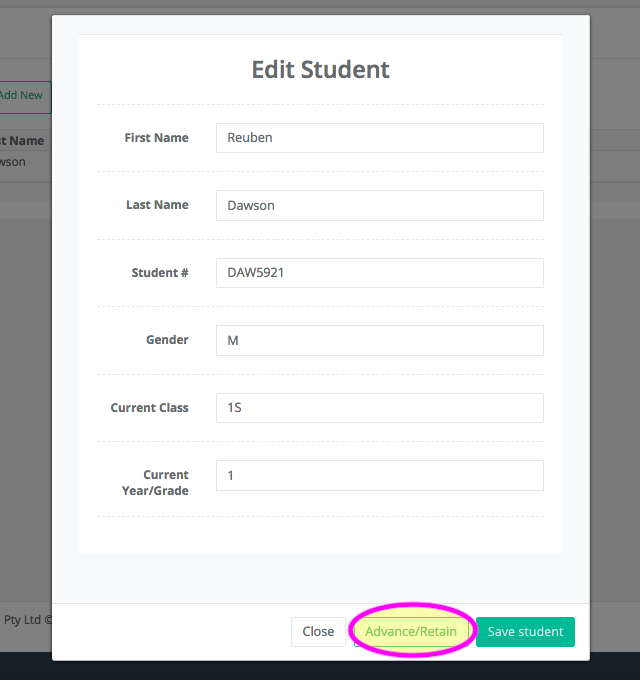
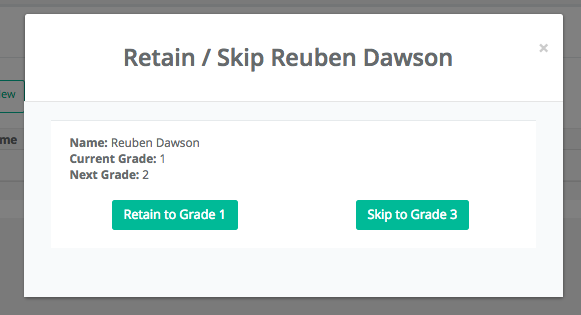
5. By Clicking the Advance/Retain button you can choose:
Do nothing
Reuben’s Current Grade Level is Grade 1, so will be placed in a Grade 2 class for next year.
Retain
Reuben's Current Grade Level will be change to Grade P, so he will be placed in a Grade 1 class for next year. Reuben will be retained to Grade 1
Skip
Reuben’s Current Grade Level will be change to Grade 2, so he will be placed in a Grade 3 class for next year. Reuben will skip Grade 2 and be placed one year ahead in Grade 3.