Docs

How can we help you?

Welcome to the Class Creator help page. If you can't find the answer you're after please contact us.

Friendship Highlights in Class Allocation

Friendship Highlights in Class Allocation

Last updated on 30 Jul, 2026

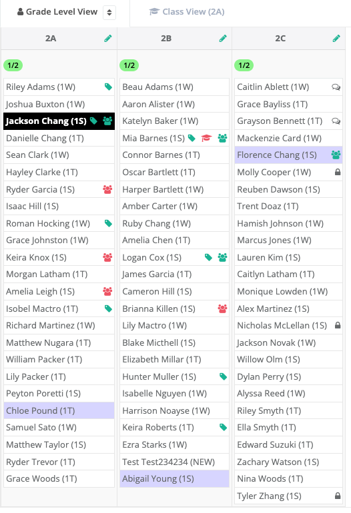
Once you have created the classes and want to see where a students friends are you will just need to click on their name and the students friendship preferences will be highlighted

In the example below, you can see that the user is wanting to know the friendship preferences for Jackson Chang, the preferences are shown in purple.
Picture6.png

Was this page helpful?
Previous

Custom Settings for Composite Classes

Next